Configuration Files & Startup Detection
Configure process management, startup detection, and config file parsing for Pterodactyl eggs
After setting the basic egg details, you need to configure how Wings will manage the server process. This includes defining how to start and stop the server, how to handle logs, and how to automatically update any configuration files. These settings are found on the egg's configuration page (under "Process Management").
Startup Command
The Startup Command is the exact command that will run to start your server. This is executed every time the server is launched (when the user clicks the Start button). You can include egg variables in this command by using the {{VARIABLE}} syntax. For example, a startup command might look like:
java -Xms128M -XX:MaxRAMPercentage=95.0 -jar {{SERVER_JARFILE}}Stop Command
The Stop Command is the command or signal used to safely stop the server. By default, many eggs use ^C (Control+C) to send an interrupt signal, which works for most console-based servers. If the application has a special shutdown command (for example, typing "stop" in a Minecraft server console), you can specify that here instead. Wings will execute this command when a user clicks the Stop button.
Log Configuration
In most cases you can leave the Log Configuration field blank (which defaults to an empty JSON {}). By default, Wings will stream all output from the container's console. The log configuration field is used only in advanced cases where the server's output needs special handling (for example, if the server writes logs only to a file and not to STDOUT, you could configure Wings to tail that file). For typical eggs, this field remains empty.
Configuration Files
Using configuration file parsing is generally an advanced feature. If you are new to creating eggs, you may skip this section unless your egg needs it.
This section allows you to define files that Pterodactyl should automatically modify each time the server starts, to ensure certain settings are always applied. You can provide a JSON object mapping file names to the values that should be set in those files. Wings will then parse and update those files before the server fully starts.
For example, consider a game that uses a server.properties file for its settings. You might add a configuration entry like this:
{
  "server.properties": {
    "parser": "properties",
    "find": {
      "server-ip": "0.0.0.0",
      "server-port": "{{server.build.default.port}}",
      "max-players": "{{env.MAX_PLAYERS}}"
    }
  }
}
Each time the server starts, Wings checks if server.properties exists:
- If it exists, Wings will update those keys to the defined values (inserting the key if it's missing).
- If the file doesn't exist, Wings will create it with those keys and values.
A more advanced example using a YAML file and wildcards:
{
  "config.yml": {
    "parser": "yaml",
    "find": {
      "listeners[0].query_enabled": true,
      "listeners[0].query_port": "{{server.build.default.port}}",
      "listeners[0].host": "0.0.0.0:{{server.build.default.port}}",
      "servers.*.address": {
        "127.0.0.1": "{{config.docker.interface}}",
        "localhost": "{{config.docker.interface}}"
      }
    }
  }
}
Parser Types
The available Parser Types are:
| Type | Description |
|---|---|
properties | .properties files with key=value pairs |
ini | Supports [sections] and key=value pairs |
yaml | Handles nested keys, supports wildcards |
json | Parses full structure, adds missing keys |
xml | Can update attributes/values via xpath |
file | Simple find/replace by line content (avoid if possible) |
Startup Configuration
The Startup Configuration (sometimes called "startup detection") is a JSON block where you define text that indicates when the server has finished starting up. This helps Pterodactyl know when to mark the server as "Online" (running) versus "Starting".
The done value can be a single string or an array of strings:
{
  "done": "Done ("
}
or with multiple possible strings:
{
  "done": [
    "Done (",
    "Server is ready"
  ]
}
When any of the strings appear in the console output, Wings will consider the server to be fully started. This helps avoid marking the server as "running" before it's actually ready.
If this section is omitted, Wings relies on process status or timeout heuristics.
Copy Settings From
The Copy Settings From option in an egg allows inheriting settings from another egg. This is useful for reducing duplication (e.g., different Minecraft flavors like Vanilla, Spigot, etc.).
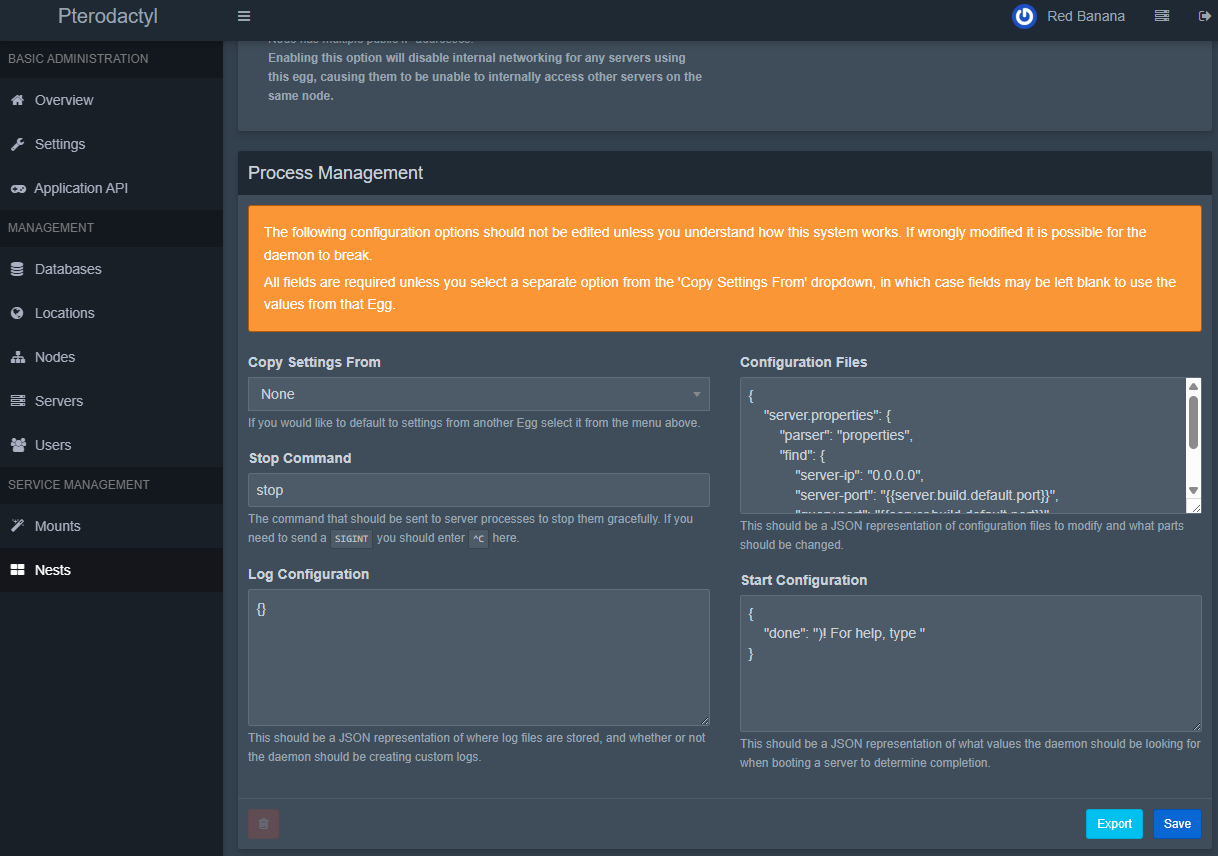
If you select another egg as a parent in "Copy Settings From," any field in the current egg that you leave blank will be inherited from the parent egg. This is very useful when you have multiple eggs that share most of their configuration (for example, different versions or mods of the same game).
Please note that Copy Settings From does not support nested copies — you can only copy from a single parent, and that parent must not be copying from another option.
Last updated on